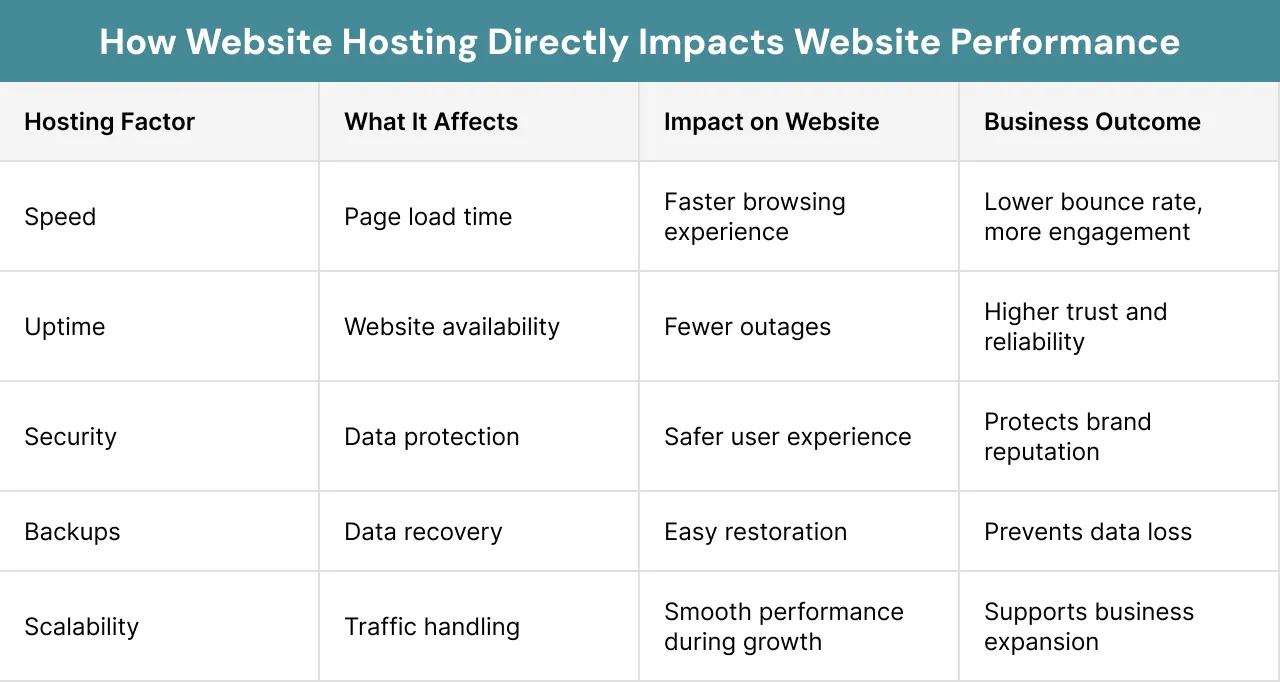
Hosting is the decision businesses spend the least time on and regret the most. It gets chosen on price, works fine for a year, and then the site goes down during your busiest week, or loads slowly for half your customers, and nobody can explain why.
Jayshree Technosoft LLP has been setting up and managing hosting and server infrastructure for businesses since 2009. This is the practical guide to choosing without needing technical knowledge.
What You're Actually Buying
Hosting is space on a computer that stays switched on so your website or application is available. The differences between options come down to how much of that computer is yours, and who is responsible when something breaks.
Shared hosting. Your site shares a server with many others. Cheapest, and adequate for a simple business website with modest traffic. The limitation is real: another site on the same server having a busy day can slow yours.
VPS (virtual private server). A guaranteed portion of a server that's yours. More reliable performance, more control, and it needs someone to manage it.
Cloud hosting. Resources that scale as needed, billed by usage. Suits applications with variable traffic and is the sensible default for most business applications now.
Dedicated server. An entire machine. Justified at real scale or for specific compliance requirements.
Managed hosting. Any of the above with someone else handling updates, security patches, backups, and monitoring. Costs more; usually worth it if you don't have technical staff.
The Question That Actually Decides It
Not "how much traffic do I have?" but: what does an hour of downtime cost your business?
If the honest answer is "not much — we'd fix it tomorrow," inexpensive shared hosting is fine and spending more is waste.
If the answer is "we lose orders and customers," you need managed hosting with monitoring and someone accountable, whatever it costs. That single question settles most hosting decisions correctly.
Where Businesses Get Hurt
Hosting registered in someone else's name. The most common and most damaging problem we're called in to fix. A developer or agency set it up under their account years ago, and now the business can't access its own infrastructure. Your hosting account and domain must be in your business's name, with credentials you hold. Verify this today if you haven't.
Domain renewal notices going to a former employee. Expired domains are among the most avoidable business disasters, and this is almost always the cause. Check where those emails go.
No backups, or untested ones. Almost every business believes it has backups. Considerably fewer have working ones. The test is simple: restore a file today, while someone watches. If nobody can demonstrate it within an hour, you have an assumption rather than a backup.
Server location chosen without thought. If most of your customers are in India, hosting in India makes your site meaningfully faster for them. If they're across regions, a content delivery network solves most of the problem cheaply.
Nobody watching. Finding out your site is down because a customer called is the worst way to find out. Basic uptime monitoring costs almost nothing.
What Good Hosting Setup Includes
Beyond the server itself, these should be in place:
SSL certificate so your site shows as secure. Free options exist and there's no excuse for a business site without one — browsers actively warn visitors otherwise.
Automated backups, stored separately. A backup on the same server as the original isn't a backup. Daily, kept for a meaningful period, and tested.
Uptime monitoring with alerts that reach a person.
Regular security updates to the server software, frameworks, and any plugins. Most compromised small business sites weren't targeted — they were running something with a known, published, unpatched vulnerability.
Email handled properly. Business email on the same basic hosting as your website frequently causes deliverability problems. A proper business email service is usually the better arrangement.
Enough resources for peaks, not just normal days. The festival week or campaign launch is exactly when you can't afford to go down.
Migrating Without Breaking Things
Businesses put off changing hosting because they fear downtime. Done properly, migration causes little or none:
Set up and test everything on the new host before switching anything. Keep the old hosting running during the transition. Change the domain settings only once the new setup is verified working. Test thoroughly afterwards — not just the homepage, but forms, payments, logins, and email.
And keep the old hosting for a few weeks afterwards. It costs little and it's your safety net.
What to Ask Any Hosting Provider or Agency
What's the uptime commitment, and what happens if it's missed? Who is responsible for security updates — you or us? How often are backups taken, where are they stored, and how do I restore one? What's the support response time for an urgent issue, including outside business hours? Will the account be in my business's name? And what happens if we want to move elsewhere?
Vagueness on any of these tells you what the relationship will be like at 11pm on a Saturday.
What We Do
Jayshree Technosoft LLP handles hosting setup, server implementation, and ongoing infrastructure management for businesses across Jaipur, Rajasthan, and India — including migrations from existing providers, security hardening, backup configuration, and monitoring.
Our standard practice: accounts in the client's name from day one, backups tested rather than assumed, and clear terms on who is responsible for what. We've been called in to fix enough situations caused by the opposite that we don't work any other way.
Unsure whether your current hosting is adequate, or who actually controls it? Get in touch — we'll start by checking what you have.
Recent Articles

Best CRM Software in Jaipur for Kirana Stores: How POS Billing CRM Simplifies Daily Operations

How DataBridgeCRM's Real Estate CRM Works, From First Enquiry to Closed Deal

How LawDesk & CADesk Work for Lawyers and Chartered Accountants